
Python Notes for Professionals provides a comprehensive guide for programmers looking to enhance their skills in Python programming. This resource covers essential topics such as variable creation, function usage, and advanced techniques like the map function and reduce operator. Ideal for both beginners and experienced developers, this guide offers practical hints and tricks to improve coding efficiency. With over 800 pages, it serves as an invaluable reference for anyone interested in mastering Python programming.

Key Points

  • Covers fundamental concepts of Python programming including variable assignment and data types.
  • Explains advanced functions like map and reduce for efficient coding practices.
  • Includes practical examples and code snippets for real-world applications.
  • Serves as a comprehensive reference for both novice and experienced programmers.
Soniya Kumari
Author:GoalKicker.com
856 pages
Language:English
Type:Textbook
Soniya Kumari
Author:GoalKicker.com
856 pages
Language:English
Type:Textbook
164
/ 856
Python
Notes for Professionals
Python
®
Notes for Professionals
GoalKicker.com
Free Programming Books
Disclaimer
This is an unocial free book created for educational purposes and is
not aliated with ocial Python® group(s) or company(s).
All trademarks and registered trademarks are
the property of their respective owners
800+ pages
of professional hints and tricks
Contents
About 1 ...................................................................................................................................................................................

Chapter 1: Getting started with Python Language 2 ......................................................................................
Section 1.1: Getting Started 2 ...........................................................................................................................................

Section 1.2: Creating variables and assigning values 6 ................................................................................................
Section 1.3: Block Indentation 10 .....................................................................................................................................

Section 1.4: Datatypes 11 .................................................................................................................................................
Section 1.5: Collection Types 15 ......................................................................................................................................
Section 1.6: IDLE - Python GUI 19 ....................................................................................................................................
Section 1.7: User Input 21 .................................................................................................................................................
Section 1.8: Built in Modules and Functions 21 ..............................................................................................................
Section 1.9: Creating a module 25 ...................................................................................................................................
Section 1.10: Installation of Python 2.7.x and 3.x 26 .......................................................................................................
Section 1.11: String function - str() and repr() 28 ...........................................................................................................
Section 1.12: Installing external modules using pip 29 ...................................................................................................
Section 1.13: Help Utility 31 ...............................................................................................................................................
Chapter 2: Python Data Types 33 ............................................................................................................................
Section 2.1: String Data Type 33 .....................................................................................................................................
Section 2.2: Set Data Types 33 .......................................................................................................................................
Section 2.3: Numbers data type 33 ................................................................................................................................
Section 2.4: List Data Type 34 .........................................................................................................................................
Section 2.5: Dictionary Data Type 34 .............................................................................................................................
Section 2.6: Tuple Data Type 34 .....................................................................................................................................

Chapter 3: Indentation 35 .............................................................................................................................................
Section 3.1: Simple example 35 .......................................................................................................................................
Section 3.2: How Indentation is Parsed 35 .....................................................................................................................
Section 3.3: Indentation Errors 36 ...................................................................................................................................

Chapter 4: Comments and Documentation 37 ..................................................................................................
Section 4.1: Single line, inline and multiline comments 37 ............................................................................................
Section 4.2: Programmatically accessing docstrings 37 ..............................................................................................
Section 4.3: Write documentation using docstrings 38 ................................................................................................
Chapter 5: Date and Time 42 ......................................................................................................................................
Section 5.1: Parsing a string into a timezone aware datetime object 42 ....................................................................
Section 5.2: Constructing timezone-aware datetimes 42 ............................................................................................
Section 5.3: Computing time dierences 44 ..................................................................................................................
Section 5.4: Basic datetime objects usage 44 ...............................................................................................................
Section 5.5: Switching between time zones 45 ..............................................................................................................
Section 5.6: Simple date arithmetic 45 ...........................................................................................................................
Section 5.7: Converting timestamp to datetime 46 ......................................................................................................
Section 5.8: Subtracting months from a date accurately 46 .......................................................................................
Section 5.9: Parsing an arbitrary ISO 8601 timestamp with minimal libraries 46 ......................................................
Section 5.10: Get an ISO 8601 timestamp 47 ..................................................................................................................
Section 5.11: Parsing a string with a short time zone name into a timezone aware datetime object 47 ................
Section 5.12: Fuzzy datetime parsing (extracting datetime out of a text) 48 ............................................................
Section 5.13: Iterate over dates 49 ..................................................................................................................................

Chapter 6: Date Formatting 50 ..................................................................................................................................
Section 6.1: Time between two date-times 50 ...............................................................................................................
Section 6.2: Outputting datetime object to string 50 ....................................................................................................
Section 6.3: Parsing string to datetime object 50 .........................................................................................................
Chapter 7: Enum 51 ..........................................................................................................................................................
Section 7.1: Creating an enum (Python 2.4 through 3.3) 51 .........................................................................................
Section 7.2: Iteration 51 ...................................................................................................................................................
Chapter 8: Set 52 ...............................................................................................................................................................

Section 8.1: Operations on sets 52 ..................................................................................................................................
Section 8.2: Get the unique elements of a list 53 ..........................................................................................................
Section 8.3: Set of Sets 53 ................................................................................................................................................
Section 8.4: Set Operations using Methods and Builtins 53 .........................................................................................
Section 8.5: Sets versus multisets 55 ..............................................................................................................................
Chapter 9: Simple Mathematical Operators 57 .................................................................................................
Section 9.1: Division 57 .....................................................................................................................................................
Section 9.2: Addition 58 ....................................................................................................................................................
Section 9.3: Exponentiation 59 ........................................................................................................................................
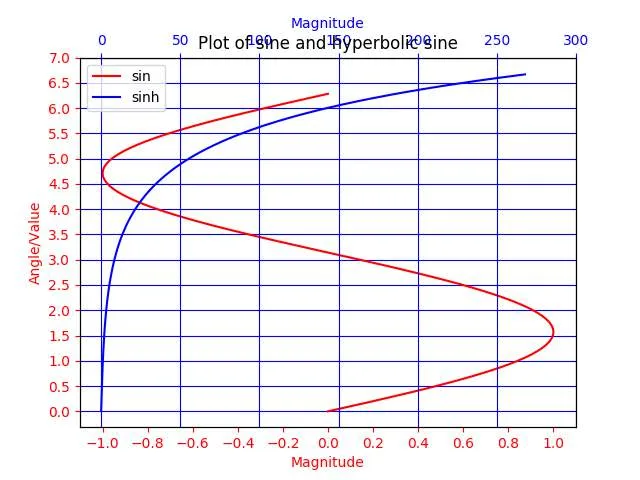
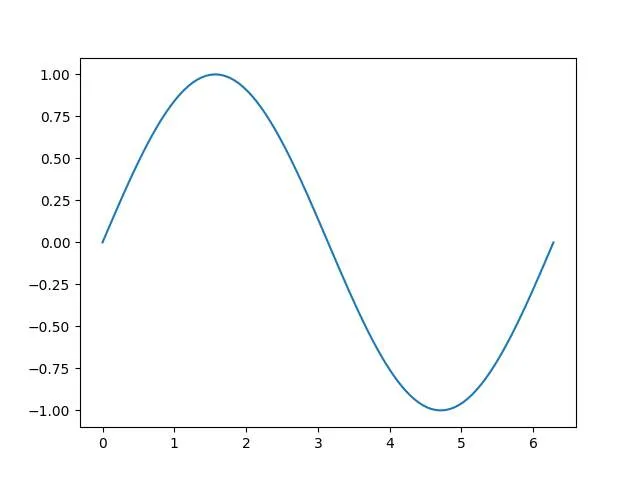
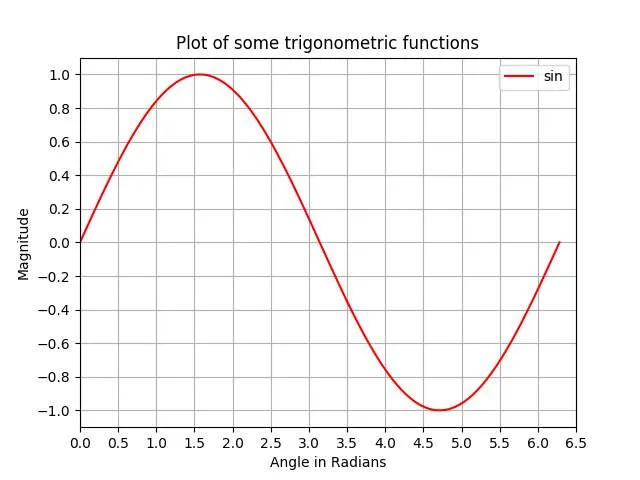
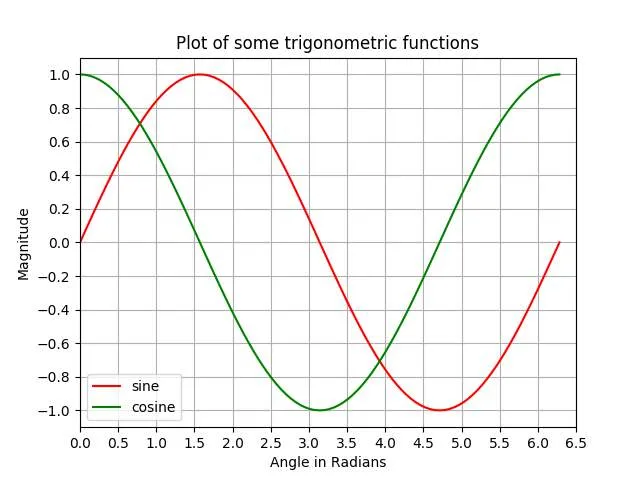
Section 9.4: Trigonometric Functions 60 ........................................................................................................................
Section 9.5: Inplace Operations 61 .................................................................................................................................
Section 9.6: Subtraction 61 ..............................................................................................................................................
Section 9.7: Multiplication 61 ...........................................................................................................................................
Section 9.8: Logarithms 62 ..............................................................................................................................................
Section 9.9: Modulus 62 ...................................................................................................................................................
Chapter 10: Bitwise Operators 65 .............................................................................................................................
Section 10.1: Bitwise NOT 65 ............................................................................................................................................
Section 10.2: Bitwise XOR (Exclusive OR) 66 ..................................................................................................................
Section 10.3: Bitwise AND 67 ............................................................................................................................................
Section 10.4: Bitwise OR 67 ..............................................................................................................................................
Section 10.5: Bitwise Left Shift 67 ....................................................................................................................................
Section 10.6: Bitwise Right Shift 68 ..................................................................................................................................
Section 10.7: Inplace Operations 68 ................................................................................................................................
Chapter 11: Boolean Operators 69 ............................................................................................................................
Section 11.1: `and` and `or` are not guaranteed to return a boolean 69 ......................................................................
Section 11.2: A simple example 69 ...................................................................................................................................
Section 11.3: Short-circuit evaluation 69 .........................................................................................................................
Section 11.4: and 70 ...........................................................................................................................................................
Section 11.5: or 70 ..............................................................................................................................................................
Section 11.6: not 71 ............................................................................................................................................................
Chapter 12: Operator Precedence 72 ......................................................................................................................
Section 12.1: Simple Operator Precedence Examples in python 72 .............................................................................
Chapter 13: Variable Scope and Binding 73 .........................................................................................................
Section 13.1: Nonlocal Variables 73 .................................................................................................................................
Section 13.2: Global Variables 73 ....................................................................................................................................
Section 13.3: Local Variables 74 ......................................................................................................................................
Section 13.4: The del command 75 .................................................................................................................................
Section 13.5: Functions skip class scope when looking up names 76 .........................................................................
Section 13.6: Local vs Global Scope 77 ...........................................................................................................................
Section 13.7: Binding Occurrence 79 ...............................................................................................................................
Chapter 14: Conditionals 80 .........................................................................................................................................
Section 14.1: Conditional Expression (or "The Ternary Operator") 80 .........................................................................
Section 14.2: if, elif, and else 80 .......................................................................................................................................
Section 14.3: Truth Values 80 ...........................................................................................................................................
/ 856
End of Document
164

FAQs

What are the main sections covered in the Python Notes for Professionals?
The document is organized into several chapters, each covering different aspects of Python programming. Chapter 1 introduces the Python language and includes sections on creating variables, data types, and user input. Chapter 2 focuses on specific data types such as strings, lists, and dictionaries. Other chapters delve into indentation, comments and documentation, date and time handling, enumerations, sets, mathematical operators, and bitwise operators.
How does the document explain the concept of indentation in Python?
Chapter 3 of the document is dedicated to indentation, which is crucial in Python as it defines the structure of code blocks. It includes a simple example to illustrate how indentation is parsed and discusses common indentation errors that programmers might encounter. Proper indentation is emphasized as a key aspect of writing syntactically correct Python code.
What types of data are discussed in the document?
The document outlines various data types in Chapter 2, including string, set, number, list, dictionary, and tuple data types. Each section provides details on how these data types function, their characteristics, and how they can be utilized in Python programming. For instance, the section on strings discusses string manipulation techniques, while the section on dictionaries covers key-value pair storage.
How does the document address date and time handling in Python?
Chapter 5 of the document focuses on date and time, detailing how to parse strings into timezone-aware datetime objects and construct such objects. It explains computing time differences, switching between time zones, and performing simple date arithmetic. Additionally, it discusses converting timestamps to datetime and parsing ISO 8601 timestamps, making it a comprehensive guide for handling date and time in Python.
What are some mathematical operators covered in the document?
Chapter 9 covers simple mathematical operators in Python, including addition, subtraction, multiplication, division, and exponentiation. It also discusses trigonometric functions and logarithms, providing insights into how these operations can be performed in Python. The chapter emphasizes the importance of understanding these operators for effective programming.
What is the significance of using comments and documentation in Python?
Chapter 4 emphasizes the importance of comments and documentation in Python programming. It explains the different types of comments, including single-line, inline, and multiline comments. Additionally, it discusses how to programmatically access docstrings and the best practices for writing documentation using docstrings, which are essential for maintaining code readability and facilitating collaboration.
What are enums and how are they created in Python according to the document?
Chapter 7 introduces enums, explaining how to create them in Python versions 2.4 through 3.3. The document provides a detailed overview of the syntax and usage of enums, highlighting their utility in defining a set of named values. This section also covers how to iterate over enums, making it easier for developers to manage related constants in their code.