

Computer Networks Notes provide comprehensive coverage of networking fundamentals, including types of networks, network devices, and OSI model layers. These notes are ideal for tech students studying for exams or seeking to understand network architecture and protocols. Key topics include LAN, WAN, transmission media, and troubleshooting techniques. This resource is essential for anyone looking to excel in computer networking courses.

Key Points

  • Covers networking fundamentals including LAN, MAN, and WAN types.
  • Explains OSI model layers and their functions in network communication.
  • Details various network devices and their roles in data transmission.
  • Includes troubleshooting techniques for common network issues.

ekta
19 pages
Language:English
Type:Study Guide
ekta
19 pages
Language:English
Type:Study Guide
58
/ 19
COMPUTER NETWORKS
Complete Exam Notes
Unit I | Unit II | Unit III | Unit IV | Unit V
Detailed Notes with Diagrams, Tables & Key Points
Unit I Networking Fundamentals
Unit II Basics of Network Devices
Unit III Network, Transport & Application Layer
Unit IV WAN Technology
Unit V Troubleshooting Networks
UNIT I
Networking Fundamentals
1.1 Basics of Network & Networking
A Computer Network is a collection of two or more computers/devices interconnected through
communication media (wired or wireless) to share resources and exchange data. Networking refers to the
practice of connecting these devices.
Advantages of Network:
Resource Sharing Printers, files, internet connections shared among users
Communication Email, messaging, video conferencing possible
Data Storage Centralized data storage and backup
Cost Reduction Shared hardware & software reduces costs
Reliability Redundant paths increase fault tolerance
Scalability New devices can be added easily
1.2 Types of Network – LAN, MAN, WAN
Feature LAN MAN WAN
Full Form Local Area Network Metropolitan Area Network Wide Area Network
Area Room / Building City / Campus Countries / Global
Speed 10 Mbps – 10 Gbps 1 – 150 Mbps Slower (varies)
Ownership Private Private / Public Public
Cost Low Medium High
Example Office network City cable TV Internet
1.3 Types of Network Architecture
Peer-to-Peer (P2P): Every computer acts as both client and server. Suitable for small networks. No central
control.
Client-Server: Dedicated server provides services; clients request them. More secure, scalable, and
manageable. Used in enterprises.
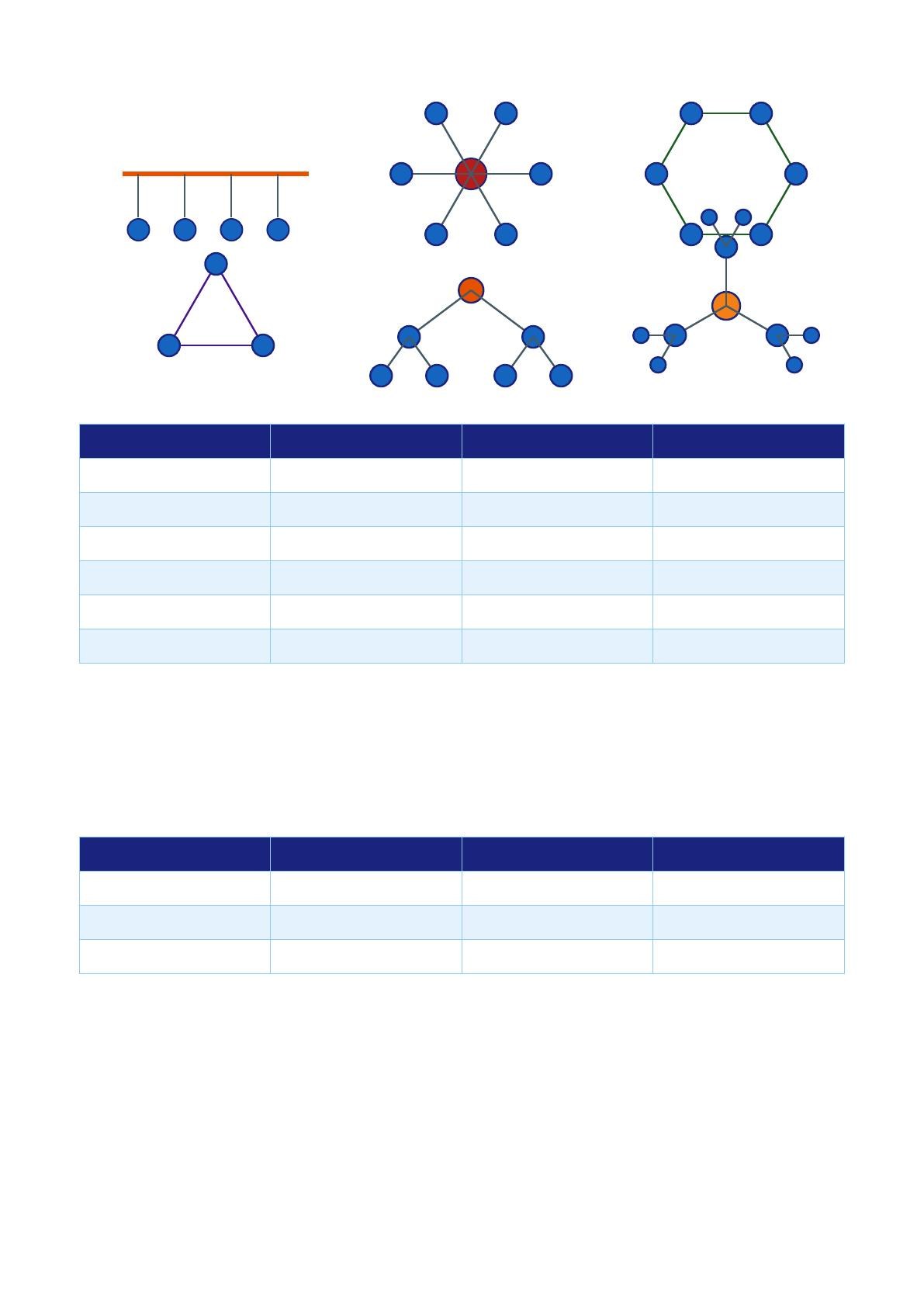
1.4 Network Topology
Network topology is the physical or logical arrangement of devices in a network.
Network Topologies
Bus Topology
Star Topology Ring Topology
Mesh Topology
Tree Topology
Hybrid Topology
Topology Advantage Disadvantage Use Case
Bus Simple, cheap Failure stops all Small networks
Star Easy to add/remove Hub failure = all down Office LAN
Ring Equal access One failure = network down Token Ring
Mesh Highly reliable Costly & complex Military, WAN
Tree Hierarchical Root failure = network down Corporate
Hybrid Flexible Complex Large networks
Logical vs Physical Topology: Physical topology = actual cable layout. Logical topology = how data flows.
Example: Token Ring is physically a star but logically a ring.
1.5 Transmission Media
Transmission media carries data signals from one device to another.
A) Guided (Wired) Media:
Media Speed Max Distance Use
Twisted Pair (UTP/STP) 10 Mbps – 10 Gbps 100m LAN (Ethernet)
Coaxial Cable 10 – 500 Mbps 500m Cable TV, older LANs
Fiber Optic 100 Gbps+ Many km Backbone, ISP
B) Unguided (Wireless) Media:
Radio Waves: AM/FM, WiFi (2.4 GHz / 5 GHz), Bluetooth
Microwaves: Point-to-point transmission, satellite links
Infrared: Short range, TV remotes, IrDA
Wiring Standards: TIA/EIA-568A and 568B define the pinout order for RJ-45 connectors. Straight-through
cables (same standard both ends) connect PC to switch. Crossover cables (568A one end, 568B other)
connect same device types.
1.6 OSI Model – All 7 Layers
/ 19
End of Document
58

FAQs

what is computer networks notes for tech students

Computer Networks Notes for Tech Students provides a comprehensive overview of networking fundamentals, including key concepts and technologies.

  • It covers types of networks such as LAN, WAN, and MAN.
  • Students will learn about network topologies, protocols, and the OSI model.
  • The notes include practical applications and troubleshooting tips for network issues.

what are the key points in computer networks notes for tech students

The key points in Computer Networks Notes for Tech Students include essential networking concepts and definitions.

  • Understanding the OSI model and its seven layers.
  • Types of network devices and their functions.
  • Differences between TCP and UDP protocols.
  • Wireless networking standards and security protocols.
  • Common troubleshooting techniques and command-line tools.

how to troubleshoot networks using computer networks notes for tech students

Troubleshooting networks using Computer Networks Notes for Tech Students involves a systematic approach to identify and resolve issues.

  1. Identify the Problem: Gather symptoms and user feedback.
  2. Gather Information: Use command-line tools like ping and traceroute.
  3. Find Root Cause: Test theories against the OSI model.
  4. Plan the Solution: Create an action plan considering side effects.
  5. Implement Solution: Apply fixes and test after each change.
  6. Verify & Document: Confirm functionality and record the solution.

what is the osI model in computer networks notes for tech students

The OSI model in Computer Networks Notes for Tech Students is a framework that standardizes networking protocols into seven layers.

  • Layer 1: Physical - deals with the physical connection.
  • Layer 2: Data Link - handles MAC addressing and error detection.
  • Layer 3: Network - responsible for routing and IP addressing.
  • Layer 4: Transport - ensures reliable data transfer.
  • Layer 5: Session - manages sessions between applications.
  • Layer 6: Presentation - translates data formats.
  • Layer 7: Application - interfaces with end-user applications.

what are common network devices in computer networks notes for tech students

Common network devices covered in Computer Networks Notes for Tech Students include essential hardware components used in networking.

  • Hub: Operates at Layer 1, broadcasts to all ports.
  • Switch: Operates at Layer 2, forwards data using MAC addresses.
  • Router: Functions at Layer 3, routes packets between different networks.
  • Bridge: Connects two network segments at Layer 2.
  • Modem: Modulates and demodulates signals for internet access.

what is the difference between tcp and udp in computer networks notes for tech students

The difference between TCP and UDP in Computer Networks Notes for Tech Students lies in their functionality and use cases.

FeatureTCPUDP
Connection TypeConnection-orientedConnectionless
ReliabilityGuaranteed deliveryNo guarantee
SpeedSlower due to overheadFaster, minimal overhead
OrderMaintains sequenceNo ordering
Use CasesHTTP, FTP, EmailDNS, VoIP, Gaming

what are the types of networks in computer networks notes for tech students

Types of networks in Computer Networks Notes for Tech Students include various configurations based on area and scale.

  • LAN: Local Area Network, typically within a building.
  • WAN: Wide Area Network, spans large geographic areas.
  • MAN: Metropolitan Area Network, covers a city or campus.
  • VPN: Virtual Private Network, provides secure remote access.

what are the wireless networking standards in computer networks notes for tech students

Wireless networking standards in Computer Networks Notes for Tech Students outline the protocols used for wireless communication.

  • 802.11b: Operates at 2.4 GHz, max speed of 11 Mbps.
  • 802.11g: Also 2.4 GHz, supports up to 54 Mbps.
  • 802.11n: Dual-band (2.4/5 GHz), max speed of 600 Mbps.
  • 802.11ac: 5 GHz, supports up to 3.5 Gbps.
  • 802.11ax: Latest standard, up to 9.6 Gbps.

what are the key troubleshooting tools in computer networks notes for tech students

Key troubleshooting tools in Computer Networks Notes for Tech Students include essential command-line utilities.

  • ping: Tests reachability and measures round-trip time.
  • traceroute: Maps the route packets take to a destination.
  • nslookup: Queries DNS servers for domain information.
  • netstat: Displays active connections and listening ports.
  • tcpdump: Captures network packets for analysis.