

DNS Configuration and Management Guide provides an in-depth understanding of Domain Name System (DNS) principles and practices. It explains how DNS translates domain names into IP addresses, making it easier for users to access websites. This guide is essential for tech students and IT professionals looking to enhance their networking skills. It covers DNS server setup, configuration, and security protocols like DNS over TLS. Ideal for those preparing for networking certifications or seeking to improve their technical knowledge in DNS management.

Key Points

  • Explains the fundamentals of Domain Name System (DNS) and its role in internet connectivity.
  • Covers DNS server configuration, including primary and secondary DNS settings.
  • Discusses the importance of DNS over TLS for enhanced security and privacy.
  • Includes practical examples for setting up DNS in various environments.
ekta
4 pages
Language:English
Type:Guide
ekta
4 pages
Language:English
Type:Guide
45
/ 4
Networkforyou
Email us:
networkforyo[email protected]
1 of 4
WhatsApp Us : +918143809578
Welcome
To
Network for you
DNS
https://t.me/learningnets
Networkforyou
Email us:
networkforyo[email protected]
2 of 4
WhatsApp Us : +918143809578
DNS Server:
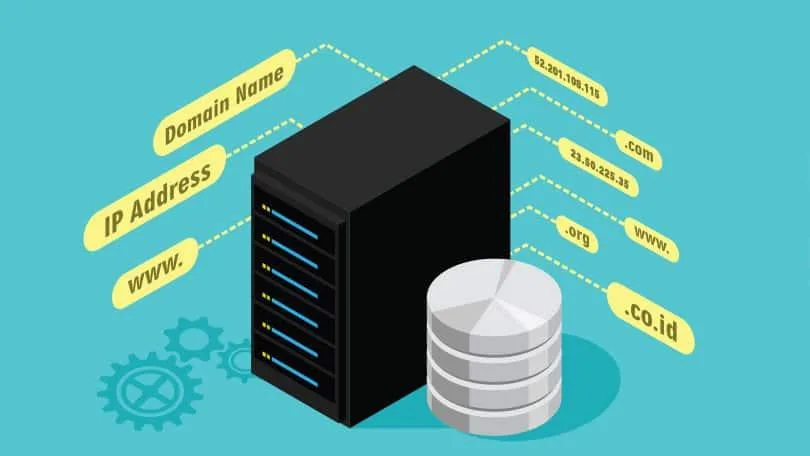
DNS Stand for Domain Name System or Domain Name Server.
DNS translates domain names to IP addresses so browsers can load Internet resources.
Each device connected to the Internet has a unique IP address which other machines use to find the
device.
DNS servers eliminate the need for humans to memorize IP addresses such as 192.168.1.1
The Domain Name System (DNS) is the phonebook of the Internet.
Humans access information online through domain names, like abc.com or google.com
DNS is a large database, which resides on various computers in world.
DNS (Domain Name System) is a network protocol that we use to find the IP addresses of hostnames.
Computers use IP addresses but for us humans it’s more convenient to use domain names and
hostnames instead of IP addresses.
DNS contain name and IP addresses of hosts on Internet and various domains.
DNS servers match domain name to their associated IP address.
DNS Convert IP address to domain name and domain name into IP address.
DNS name are assigned through the internet Registries by the IANA.
There are 13 root name Servers from a.root-server.net to m.root-server.net
13 DNS root name servers can be check on this link www.root-servers.org
DNS primarily uses User Datagram protocol on port number 53 to serve requests.
https://t.me/learningnets
Networkforyou
Email us:
networkforyo[email protected]
3 of 4
WhatsApp Us : +918143809578
DNS Configuration:
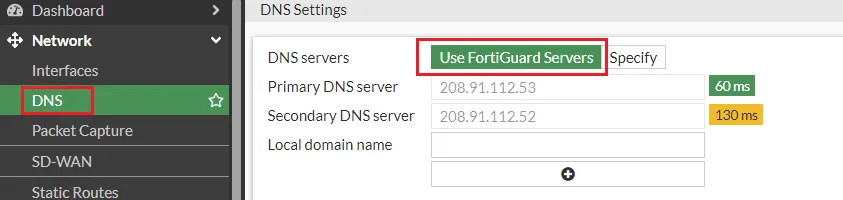
Go to Network > DNS by default, using Fortinet’s FortiGuard severs are select.
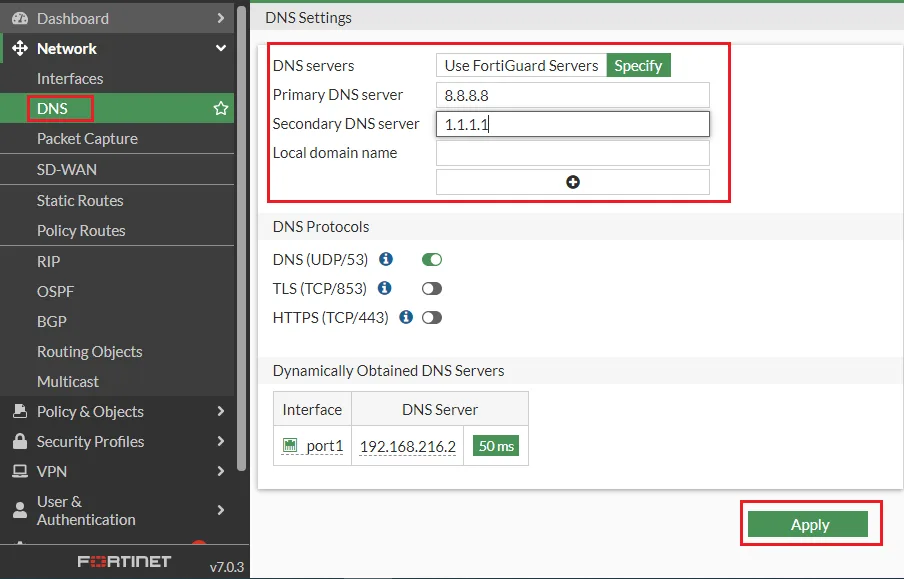
It is possible to specify using different DNS server, click on Specify and enter in primary / secondary
DNS servers.
In Primary DNS Server, type the IP address of the primary DNS server 8.8.8.8. In Secondary DNS
Server, type the IP address of the secondary DNS server 1.1.1.1
Click Apply button to save the changes.
https://t.me/learningnets
/ 4
End of Document
45

FAQs

how to configure DNS in DNS Configuration and Management Guide

To configure DNS in the DNS Configuration and Management Guide, navigate to the Network settings and select DNS.

  • By default, Fortinet’s FortiGuard servers are selected.
  • You can specify different DNS servers by clicking 'Specify' and entering the primary and secondary DNS server IP addresses.
  • For example, use 8.8.8.8 for the Primary DNS Server and 1.1.1.1 for the Secondary DNS Server.
  • Finally, click the 'Apply' button to save your changes.

what is DNS in DNS Configuration and Management Guide

DNS, or Domain Name System, is a crucial component of the internet, as explained in the DNS Configuration and Management Guide.

  • It translates human-friendly domain names into IP addresses, enabling browsers to load internet resources.
  • Each device connected to the internet has a unique IP address, which DNS servers help locate.
  • The DNS acts like a phonebook, allowing users to access information online through domain names instead of IP addresses.
  • DNS servers maintain a large database of domain names and their corresponding IP addresses.

what are the steps to set up DNS in DNS Configuration and Management Guide

Setting up DNS involves several key steps as outlined in the DNS Configuration and Management Guide.

  1. Go to the Network settings and select DNS.
  2. Choose to specify different DNS servers and enter the IP addresses.
  3. For Primary DNS, enter 8.8.8.8, and for Secondary DNS, enter 1.1.1.1.
  4. Click the 'Apply' button to save your configuration.
  5. In the Local Domain Name field, you can add domains such as abc.com.

what is DNS over TLS in DNS Configuration and Management Guide

DNS over TLS is a security protocol mentioned in the DNS Configuration and Management Guide.

  • It encrypts and wraps DNS queries, enhancing user privacy and security.
  • By using DNS over TLS, eavesdropping and man-in-the-middle attacks on DNS data are prevented.
  • This protocol ensures that DNS queries are answered securely via the TLS protocol.

how does DNS work in DNS Configuration and Management Guide

DNS operates as a network protocol that translates domain names into IP addresses, as detailed in the DNS Configuration and Management Guide.

  • When a user types a domain name into a browser, DNS servers match it to its associated IP address.
  • This process eliminates the need for users to memorize complex IP addresses.
  • DNS servers use the User Datagram Protocol on port number 53 to serve requests.